
From your website to your first campaign.
Share your website
Your site tells the agent what you sell and who you serve. It suggests audiences and outreach campaigns. You can preview the starting point before signing in.
Choose your campaign
Pick the audience that fits your business. Review the sample leads and email copy, and adjust the offer or targeting before you go live.
Enable Auto Outreach
DitLead provides the mailboxes when Auto Outreach is enabled. Review your sending schedule and launch when you’re ready. Previewing a campaign does not send emails.
The work between finding a lead and getting a reply.
Lead finding, prospect research, emails and follow-ups come together in one B2B outreach automation workflow.
Find buyers who fit
The agent uses your business and target audience to find relevant prospects. Keep campaigns focused on the buyers your offer can help.
Research and write
Prospect research gives each email a reason: why this company, why your offer, and what you’re asking for. The agent prepares personalized emails around that context.
Send and follow up
Once you launch, the agent sends emails and scheduled follow-ups using the mailboxes DitLead provides. Replies arrive in Unibox so you can follow the conversation.
See the audience before you launch.
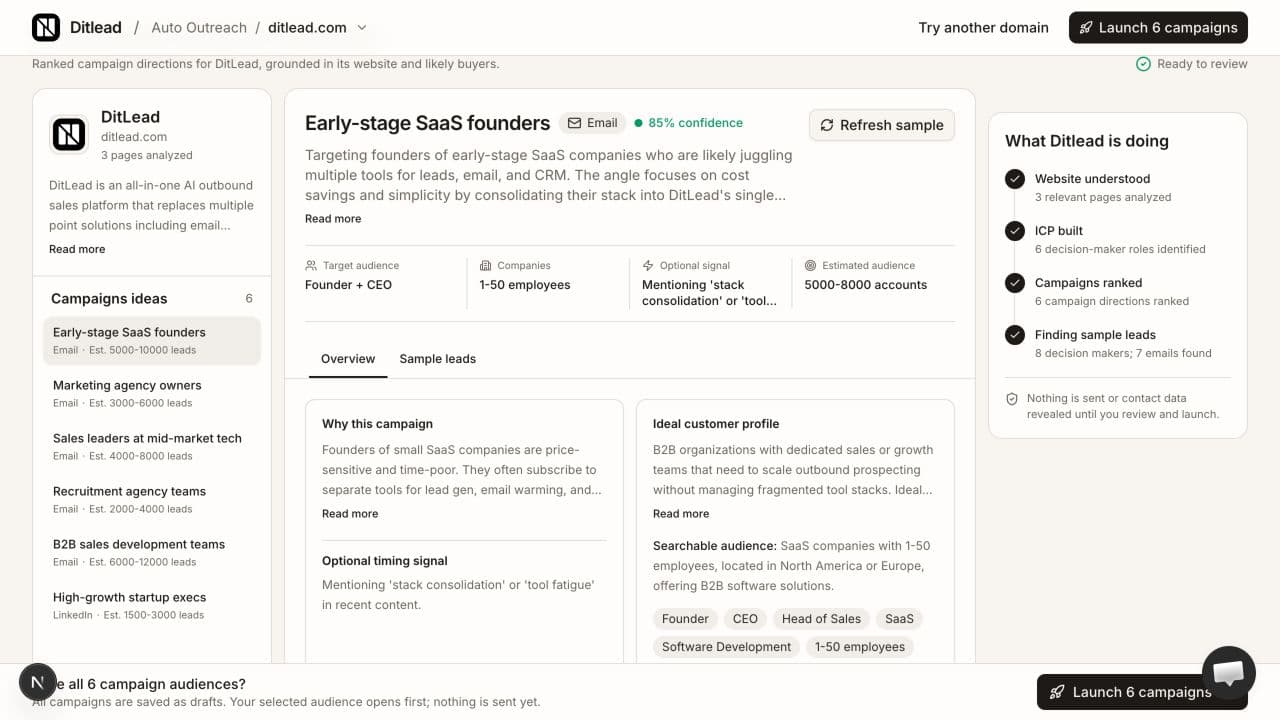
A real preview for ditlead.com: company research, buyer segments and campaign directions. Audience totals and confidence are planning aids; review the fit before launch.
Auto Outreach questions.
Talk through your audience, offer and outreach workflow with our team.
Talk to salesExplore your outreach workflow.
Auto Outreach setup guides
Step-by-step help for website previews, trial access, agent controls and troubleshooting.
How to automate B2B outreach
A practical guide to audiences, research and campaign review.
Cold email personalization examples
See how research gives an email a relevant reason.
B2B cold email sequence examples
Read three offers with messages and follow-ups.