
Introducing Auto Outreach
An AI sales agent that does the outreach for you.
DitLead finds leads, sends personalized emails, and follows up for you.
Don't have a website? Set up manually.
See the outreach DitLead would run for you.
A useful campaign preview starts with your website. Explore the plan, then decide what to launch.
Enter your website
DitLead reads your company site to understand what you sell, who it helps, and why buyers choose you.
Explore your opportunities
See researched buyer audiences, ranked campaign ideas, sample prospects, and message previews.
Review before launch
Choose a direction, make it yours, and prepare your campaign. Outreach starts only when you approve it.
Six capabilities,
one outbound engine.
Each tile below replaces a tool teams used to license separately. Click any row to read the full breakdown.
Jump to full index →Unlimited email sending
Paid plans have no DitLead daily or monthly sending cap. Mailbox-provider limits, account capacity and configured pacing still apply.
Multi-channel outreach
Email, LinkedIn & cold calls inside one cadence. Conditional branches and reply detection help coordinate your next touch.
Auto Outreach
Enter your website. DitLead researches audiences, samples prospects, and drafts campaigns you can review before launch.
Email warmup
Warm mailboxes and review sender reputation alongside your outreach. Inbox placement also depends on your list, content and mailbox provider.
Outbound-first CRM
Review replies, manage deal stages and keep outreach activity alongside your pipeline in one workspace.
Drag-&-drop sequences
Build steps, delays and conditional branches visually. Review the sequence before scheduling your campaign.
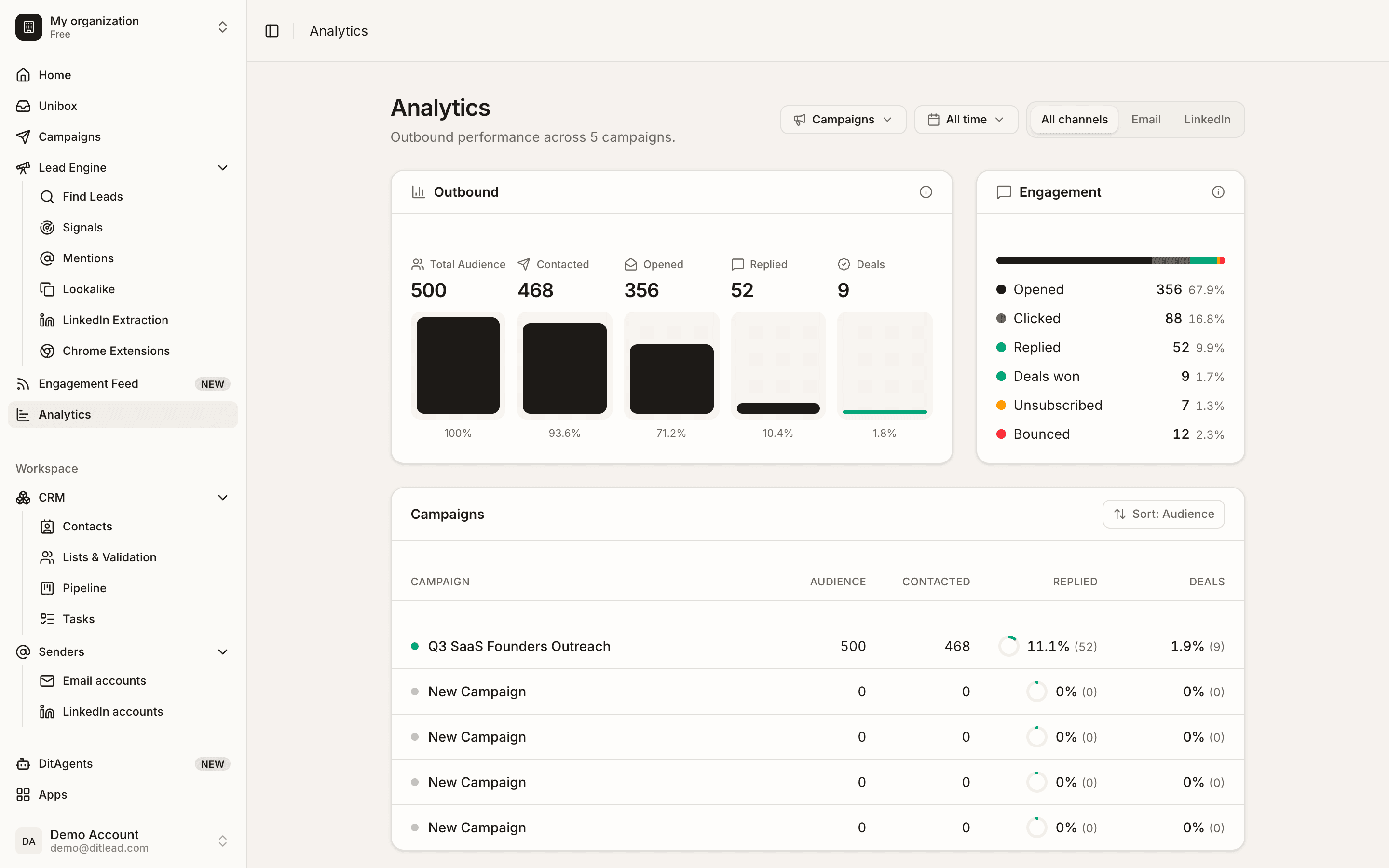
Your entire outbound engine, in one dashboard.
Find leads, warm mailboxes, run multi-channel campaigns and watch every reply and deal land — this is the real DitLead workspace, not a mockup.
Send unlimited emails from unlimited inboxes
Paid DitLead plans have no platform daily or monthly email-sending cap. Connect mailboxes and spread sending across your pool; provider limits, mailbox capacity and your configured pacing still apply.
- Unlimited mailbox connections on paid plans
- Smart sender rotation across your pool
- Per-domain pacing + automatic throttle on issues
- Custom tracking domains and SPF/DKIM checks


Email, LinkedIn & cold calls in one sequence
Reach prospects on the channel they actually answer. DitLead orchestrates cold email, automated LinkedIn touches, and power-dialed calls inside a single sequence — with auto-pause on reply.
- Connect LinkedIn accounts with plan-based account fees
- Cold email at scale with intelligent sender rotation
- Power dialer with AI talk-tracks for cold calls
- Conditional branching · auto-pause when prospects reply
Describe your campaign. AI builds it in 2 seconds.
Tell DitLead who to target and what to say. Your AI sales rep pulls verified leads from a verified lead database, writes personalized copy for every contact, and launches across email, LinkedIn, and calls — automatically.
- Leads auto-generated from your prompt — no list-building
- Personalized copy auto-written per contact
- Inboxes warmed, sequences launched, replies routed
- Re-prompts and tunes itself based on what's converting
Verified B2B contacts. Ready to ship.
Search and enrich from a real-time database aggregating 200+ premium sources. Filter by industry, role, location, tech stack, headcount and intent — then push straight into a campaign.
- Verified contacts and companies, refreshed in real time
- 200+ data sources merged and de-duped automatically
- Verified emails, direct dials & LinkedIn profiles
- Built-in intent signals: hiring, funding, tech change
Meet prospects where they are
From the manual grind — to outbound on autopilot.
One platform for your entire outbound motion
Unlimited Email Sending
Connect unlimited mailboxes and send without daily caps. Smart sender rotation spreads volume so every account stays healthy.
Read deep-diveMulti-Channel Sequences
Combine email, LinkedIn and cold calls into one automated flow. Prospects hear from you on the channel they answer.
Read deep-diveLinkedIn Lead Extraction
Paste any LinkedIn URL — Sales Nav, post, group, event, company — DitLead extracts every lead with verified email in the cloud.
Read deep-diveInbox Warmup & Deliverability
A 55,000+ inbox warming network builds sender reputation automatically, so your campaigns land in the primary inbox.
Read deep-diveAI Campaign Builder
Describe your target and message in plain English. DitLead finds leads, writes personalized copy, warms inboxes, and launches.
Read deep-diveLinkedIn Outreach Automation
Unlimited connected accounts, dedicated residential proxies, AI-personalized invites and DMs alongside email and calls.
Read deep-diveSix motions.
One outbound engine.
Whatever you sell and whoever you sell to, DitLead adapts to your motion. Pick yours below — every link opens its dedicated playbook.
B2B sales
Fill your pipeline with qualified meetings on autopilot.
Open playbookMarketing agencies
Run unlimited outreach for every client from one white-label workspace.
Open playbookRecruitment
Source and engage candidates across email and LinkedIn at scale.
Open playbookSaaS
Acquire users and book product demos without burning your budget.
Open playbookE-commerce & DTC
Open wholesale and B2B accounts with targeted multi-channel outreach.
Open playbookProfessional services
Keep your calendar full of high-intent discovery calls.
Open playbook“What I like best about DitLead is how easy it is to manage leads and outreach in one place. The interface is clean, simple to use, and it saves a lot of time.”
Plugs into the stack
you already run.
Sync contacts, log activity, and trigger workflows across your CRM, data and automation tools — no engineering required.
Browse 50+ integrations












Questions, answered
Everything you need to know about sending, deliverability, and getting started.
Talk to sales