
The numbers behind a 47% acceptance rate
Automate LinkedIn, safely.
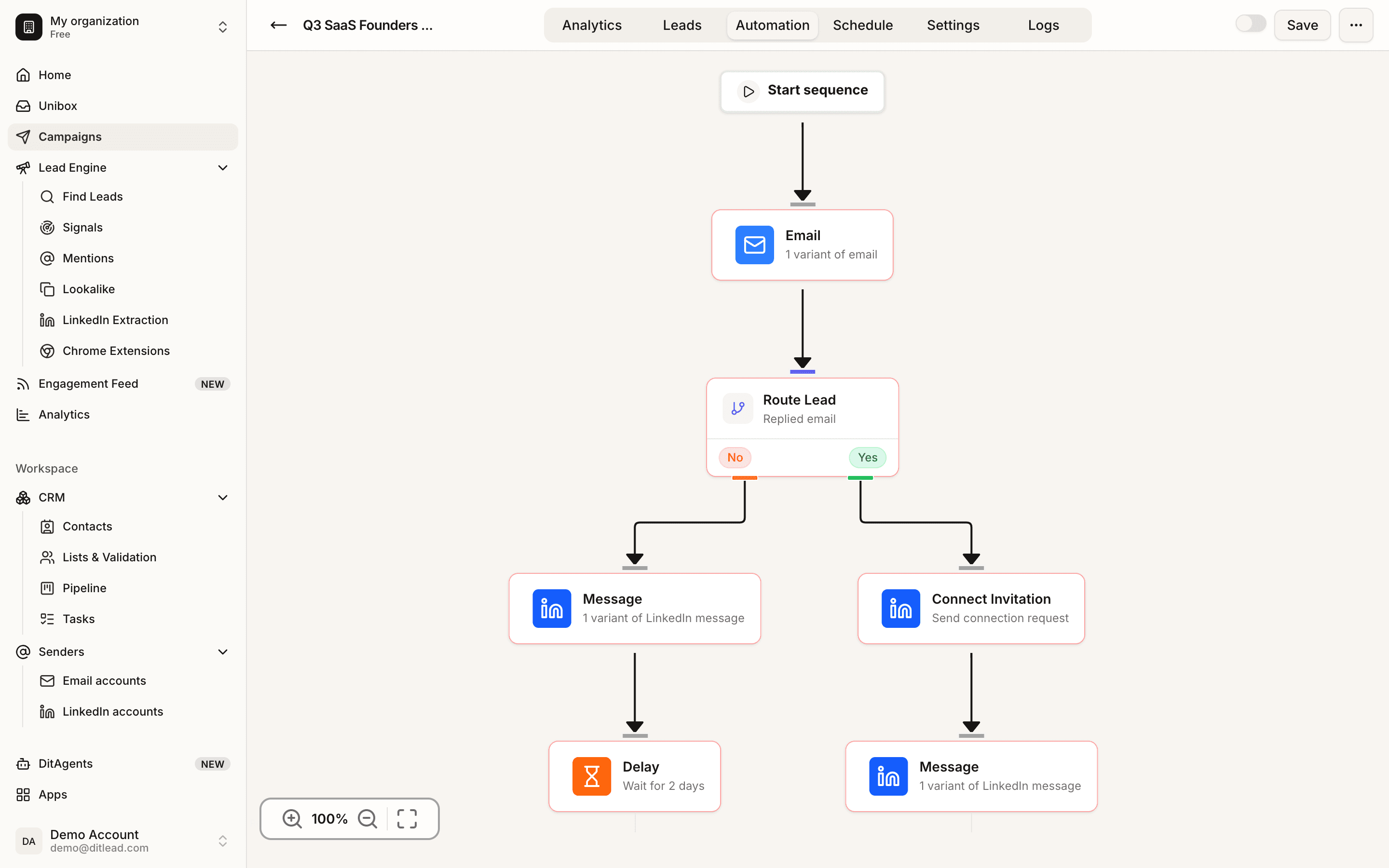
Build multi-step, multichannel sequences — connection requests, LinkedIn messages, email and delays — that branch on how each lead responds.
LinkedIn outreach automation for software, agency and service teams
Whether you are comparing LinkedIn automation software, running a LinkedIn outreach agency, or packaging LinkedIn outreach as a service, DitLead gives you the safety layer, personalization layer and multichannel follow-up in one workspace.
LinkedIn outreach automation software, not a loose browser plugin
Run profile views, connection requests, follow-up DMs and InMails from DitLead's cloud infrastructure. Each account gets its own proxy, pacing rules and activity budget so automated LinkedIn outreach behaves like a careful human operator.
- Cloud execution without keeping a Chrome tab open
- Connection notes and DMs generated per prospect
- Quiet hours, randomized delays and account-level caps
- Every reply routed into the shared inbox
Hi Anna — loved your post on attribution last Tuesday. Saw Stripe's Series B — congrats. We help VP-marketers cut attribution debate by 60%.▍
Built for LinkedIn outreach agencies and client workspaces
Agencies can run LinkedIn outreach for multiple clients without mixing lists, replies, reports or account health. Sub-workspaces keep each client isolated while operators monitor every sender from one command center.
- One workspace per client or business unit
- Unlimited connected LinkedIn seats
- Per-client reporting and inbox ownership
- Role-based access for clients and operators
A LinkedIn outreach service engine inside a multichannel platform
If your team sells or runs a LinkedIn outreach service, DitLead connects the whole workflow: source leads from Sales Navigator, enrich contacts, launch LinkedIn-first cadences, then continue over email and calls when LinkedIn limits would otherwise slow the campaign.
- Sales Navigator and Recruiter URL auto-import
- Email verification and enrichment built in
- LinkedIn + email + calls in one sequence
- Auto-pause when a prospect replies anywhere
Everything you'd do manually — but at the scale of a real outbound team
Profile views, connection requests, follow-ups, InMails, soft engagement and event invites — all on a human-paced schedule, every one personalized.
Warm the prospect before you ask
A profile view 24–72 hours before a connection request lifts acceptance by 18% on average. DitLead runs profile views on a random schedule that mirrors a real user's browsing pattern.
- Random schedule within each account's quiet hours
- Auto-skip if you've viewed in the last 90 days
- Routes through the account's dedicated proxy
Three moves, every LinkedIn campaign
Connect accounts, let AI personalize, orchestrate touches across channels.
Plug in your LinkedIn accounts
OAuth in two clicks for every seat your team owns. Each account is assigned a sticky residential proxy and its own daily activity budget — automatically.
AI writes every touch
Connection notes, follow-up DMs and InMails are generated per-contact from the prospect's headline, posts, role, company, mutuals and intent signals.
Orchestrate across channels
Drop LinkedIn steps next to email and call steps on one canvas. Conditional branching + auto-pause keep every touch in sync — and stop the moment a prospect replies.
Four pillars of LinkedIn outreach that actually converts
Most LinkedIn tools nail one of these. DitLead ships all four — and ties them to email and calls so the whole motion lives in one place.
Per-prospect personalization that beats every template
Generic copy is why most LinkedIn outreach fails. DitLead writes a unique connection note, follow-up and InMail for every prospect — calibrated to their profile, their recent posts, mutual connections, role transitions and any intent signal you've layered on.
- Trained on the top-converting opener for each ICP
- Pulls headline, recent posts, role tenure, mutuals
- Adjusts tone for founder vs. enterprise buyer
- Surfaces 3 alternate openers for A/B tests
Hi Anna — loved your post on attribution last Tuesday. Saw Stripe's Series B announcement — congrats. We help VP-marketers cut attribution debate by 60% with multi-touch reporting. Worth a chat?
Account safety, engineered into every action
Each connected LinkedIn account ships with a dedicated sticky residential proxy, human-like pacing with randomized delays, a per-account daily activity budget, and live restriction-risk scoring that throttles automatically if anything trends in the wrong direction.
- Dedicated residential proxy per account
- Per-account daily budgets (50–80 invites/wk)
- Randomized delays, weekends-off, quiet hours
- Live account-health score with auto-throttle
Multi-step LinkedIn cadences inside multi-channel sequences
Profile view → connection request → wait → follow-up DM → wait → InMail → email step → call step. Every transition runs on a condition: accepted, ignored, opened, replied. The cadence pauses the moment a prospect engages — anywhere.
- 10+ LinkedIn step types incl. endorsement & post-like
- Conditional branches: accepted / ignored / replied
- Auto-pause across email + LinkedIn + calls
- 60+ proven LinkedIn cadence templates
Sales Navigator on autopilot
Paste a Sales Navigator search URL. DitLead reruns the search on the schedule you set, pulls every new matching lead, verifies the corporate email, and drops them into your sequence automatically. No CSV exports, no Phantombuster glue code.
- Paste a Sales Nav URL, set a refresh cadence
- Auto-enriches with verified email + phone
- Dedupes against your CRM and prior campaigns
- Recruiter searches supported on the Scale plan
Every capability your team needs to run LinkedIn at scale
The features that turn unlimited accounts into a predictable booked-meetings engine.
Unlimited LinkedIn accounts
Connect every seat your team owns — no per-seat fee, no add-on, no cap.
0 add-onsDedicated residential proxy
Sticky real-user IP per account. Datacenter proxies are why others get flagged.
Per-accountAI-personalized invites
Per-contact notes from profile, posts, mutuals and intent signals.
Unique per leadHuman-like pacing
Randomized delays, per-account budgets, quiet hours, weekends-off.
Safe-by-defaultConditional branching
Branch on accepted, ignored, opened, replied — and across channels.
10+ signalsMulti-channel sequences
LinkedIn next to email and calls. Auto-pause on reply anywhere.
Email + LI + callsUnified inbox for replies
Every DM, accept and InMail lands next to email and call notes.
1 queueSales Navigator on autopilot
Paste a search URL. New matching leads import on a schedule.
Auto-importLive account-health score
Restriction risk scored 0–100. Auto-throttle on drop.
Real-timeWhat teams hit on DitLead
Illustrative benchmarks, not measured guarantees — your results depend on ICP, offer, list quality and copy.
Every team that lives on LinkedIn
LinkedIn outreach looks different by motion. DitLead ships tone packs, cadence templates and integrations for each one.
Founders & operators
Founder-led outbound to similar-stage founders, investors and design partners.
- Per-prospect AI in your voice
- Auto-pause when a reply lands
- CRM-light pipeline included
Sales teams
SDR/AE teams running multi-account, multi-channel outbound at scale.
- Per-rep ownership + leaderboards
- Sales Nav search auto-import
- Multi-channel auto-pause
Recruiters
Candidate sourcing on Recruiter or Sales Nav with personalized first-touch.
- Recruiter search URLs supported
- ATS sync (Greenhouse, Lever)
- Candidate-friendly tone packs
Agencies
Run LinkedIn outreach for 5–500 client workspaces from one dashboard.
- White-label sub-workspaces
- Per-client billing + reporting
- Role-based access
Marketers
Webinar fills, event invitations, ABM warm-up and content amplification.
- Event-invite step
- RSVP-aware reminders
- ABM list import from any CSV
Investors & partnerships
VC scouts, partnerships and BD reaching out to founders and execs.
- Mutual-connection prioritization
- Fund-stage and traction filters
- Polished, founder-friendly tone
Six LinkedIn cadences you can clone today
Templates with proven outcomes by motion. Clone one, edit the offer, hit launch.
Founder-led outbound
8-touch cadence to similar-stage founders. Profile view → connect with AI note referencing a recent post → DM after accept → email step → InMail to non-accepts.
VP-level ABM
12-touch ABM cadence targeting decision-makers at 200 target accounts. LinkedIn-first, email-second, call-third with branching on accept.
Recruitment sourcing
Candidate-friendly cadence: like a recent post → endorse a skill → connect with AI note referencing the candidate's work → follow-up DM with the role.
Agency new business
Mutual-first cadence for agencies: filter by mutual connection density → AI note referencing the shared connection → DM after accept → email + Loom step.
Event & webinar fills
Invitation cadence: AI-personalized event invite → reminder DM 3 days before → calendar drop in the email step → no-show follow-up.
Investor / BD outreach
Polished founder-friendly cadence for VCs scouting deals: profile view → connect with traction reference → DM with one-liner + deck → email follow-up.
What changes the day you switch
Two columns. Left is what you get on day one. Right is the LinkedIn-tool theater you stop putting up with.
- 01Unlimited LinkedIn accounts with no per-seat fee
- 02Dedicated residential proxy provisioned per account
- 03AI-personalized invites, DMs and InMails per contact
- 04Sales Navigator + Recruiter URL auto-import
- 05Multi-step LinkedIn cadences with branching
- 06LinkedIn next to email and calls in one sequence
- 07Auto-pause sequence on reply across channels
- 08Unified inbox for every DM, accept and InMail
- 09Live account-health score with auto-throttle
- 10CRM sync + activity auto-logged to the deal
- 01Per-seat fees that punish you for hiring
- 02Shared or datacenter proxies that get accounts flagged
- 03Generic 'spintax' templates that read like a bot
- 04Sales Nav CSV exports, manual cleanups and Zaps
- 05Linear single-channel cadences without branching
- 06Three separate tools for email, LinkedIn and calls
- 07Reps double-touching prospects who already replied
- 08LinkedIn DMs lost in personal inboxes
- 09Manual throttling and panicked weekend pauses
- 10Spreadsheet 'CRM' that nobody actually logs to
The 0.3% restriction rate — explained
The #1 reason LinkedIn accounts get flagged isn't volume — it's signal hygiene. Datacenter proxies, shared IPs, mechanical timing, identical messages. DitLead engineers out every one.
Read the safety guideDedicated residential proxy
Sticky real-user IP assigned to one account only. Never shared. Geo-matched to the account's primary location.
Human-like pacing engine
Randomized delays between actions, weekend respect, quiet hours per timezone, per-account daily budgets.
Live restriction-risk score
0–100 score from action mix, response patterns and platform signals. Auto-throttle below 70.
Account-health alerts
Slack, email or webhook the moment anything trends in the wrong direction — before LinkedIn notices.
LinkedIn automation that does more than LinkedIn
Most LinkedIn tools stop at LinkedIn. DitLead pairs unlimited accounts with email, calls, a unified inbox, a 700M+ lead database, and dedicated residential proxies.
| Capability |  DitLead DitLead | Dripify | Expandi | Smartlead | Waalaxy | Heyreach |
|---|---|---|---|---|---|---|
| Unlimited LinkedIn accounts | Add-on | Per-seat | ||||
| Dedicated residential proxy / account | Datacenter | Manual | ||||
| Per-contact AI invites | Spintax | Spintax | Limited | Limited | ||
| Sales Navigator URL auto-import | ||||||
| Multi-channel (email + calls) | All 3 | Email only | ||||
| Cold calling built-in | ||||||
| Live account-health score | Basic | Basic | ||||
| Unified inbox (email + LI + calls) | Partial | |||||
| Lead database included | 700M+ | 280M+ | ||||
| Starting price per LI seat | $0 | $59 | $99 | $30 add-on | $49 | $99 |



LinkedIn automation, explained
Still curious? Our team responds in under an hour.
Talk to salesKeep exploring DitLead
Best LinkedIn Automation Tools
See the 2026 tool category and how DitLead compares.
DitLead vs HeyReach
Agency LinkedIn outreach compared with multichannel outbound.
Multi-Channel Outreach
LinkedIn + email + calls orchestrated in one sequence.
AI Campaign Builder
Describe a campaign — AI assembles the whole multi-channel sequence.